

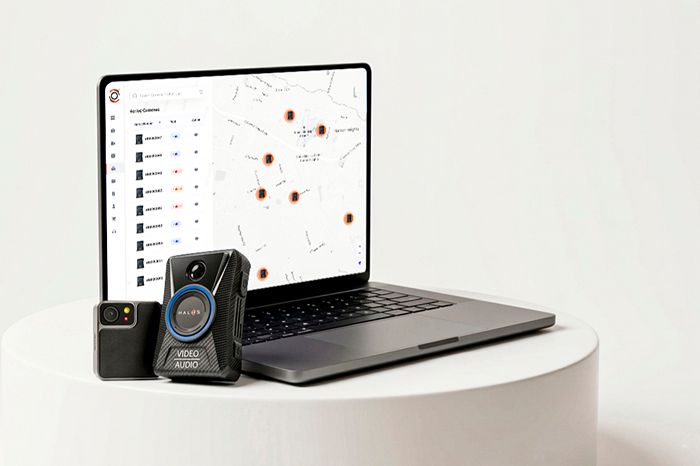
If you are reading body camera reviews as part of a procurement or upgrade cycle, you are already doing the right thing. A body-worn camera program is not a one-time hardware purchase. It is an operational system that touches policy, training, public trust, and case outcomes.
That is why body camera reviews matter. They help decision-makers move beyond spec sheets and ask questions that determine long-term success. Video quality and battery life are important, but evidence management is where programs win or fail over time. If uploading is slow, storage grows unexpectedly, redaction is painful, or audit trails are incomplete, the day-to-day burden lands on supervisors, records staff, and compliance teams.
A smart review process treats the camera and the evidence platform as one ecosystem. The goal is simple. Capture the right footage, protect it, find it fast, and share it safely when needed.
TL;DR
- Body camera reviews should evaluate evidence management, not just camera specs, because storage, workflows, and compliance drive long-term success.
- Prioritize scalable storage, strong chain of custody, efficient redaction, and fast search and retrieval.
- Compare cloud vs on-premise using security controls, compliance needs, and total cost over time.
- Validate integrations with RMS, CAD, and broader digital evidence management systems to reduce manual work.
- Model true cost including licensing, storage growth, redaction labor, and vendor lock-in before you commit.
Why Evidence Management Matters More Than Hardware?
Many buyers start with the device because it is tangible. But the platform that stores, secures, and governs footage is where most operational risk lives. When body camera reviews focus only on the camera, teams miss the real cost and compliance factors.
Storage scalability
Evidence volume grows faster than most teams expect. As adoption increases, so do recording hours, resolution settings, and retention needs. Evaluate:
- How storage scales with volume and policy changes
- Whether pricing is predictable as usage expands
- Whether the system supports tiering or archiving options without breaking workflows
Chain of custody integrity
Chain of custody is not just a legal concept. It is a daily requirement for maintaining trust in evidence. Strong systems typically include:
- Automatic logging of uploads, views, edits, exports, and shares
- Tamper-evident controls and integrity checks
- Clear user attribution for every action taken on a file
Redaction capabilities
Redaction is where timelines and budgets often get hit. Review platforms for:
- Built-in redaction tools for faces, screens, license plates, and sensitive scenes
- Collaboration features for review, approval, and version control
- Export options that preserve audit history and redaction records
Search and retrieval efficiency
Footage is only useful if teams can find it quickly. Look for:
- Fast search by officer, case number, location, timestamp, and tags
- Simple workflows for linking evidence to cases
- Bulk actions for review, retention updates, and sharing
Cloud vs On-Premises Evidence Storage: Which Is Better?
A key decision in body camera reviews is where evidence lives. Cloud and on-premise both have valid use cases, but the risk profile is different.
Security considerations
Security is a baseline requirement regardless of deployment model. Evaluate:
- Encryption in transit and at rest
- Access controls and authentication options
- Security monitoring, incident response, and account protections
Cloud platforms often provide continuous security updates and centralized controls. On-premises may provide more direct ownership of infrastructure but require in-house resourcing for patching, monitoring, and resilience.
Cost implications
Upfront cost and long-term cost are not the same thing. Cloud typically aligns cost to usage and scales with growth. On-premises may appear cheaper after purchase, but include realistic operational costs:
- Hardware refresh cycles
- Backup systems and redundancy
- Staff time for maintenance and security
- Expansion costs when storage needs jump
Compliance requirements
Depending on your jurisdiction and policies, you may have specific requirements for where evidence can be stored, who can access it, and how audits are handled. Your review criteria should map to your compliance obligations, not vendor claims.
Pro Tip: Run a 3-to-5-year total-cost-and-compliance checklist using your real retention policy and footage volume, then choose the option that still passes audits with the least admin burden.
Integration with Existing Systems: What to Check?
Most agencies and security organizations already run operational systems that must connect to body-worn camera evidence.
RMS integration
Practical integration reduces manual data entry and improves case continuity. Evaluate:
- Whether evidence can be associated with reports using case numbers and incident IDs
- Whether metadata sync is reliable and easy to administer
- Whether sharing evidence into case files is controlled and auditable
CAD integration
CAD linkage can strengthen timelines and reduce administrative work. Look for support for:
- Event-based tagging tied to CAD incidents
- Consistent identifiers across dispatch and evidence systems
- Workflows that reduce duplicate entry
Digital evidence management systems
Many organizations manage evidence beyond body cameras, including dash cams, interview room video, photos, and third-party files. Your evidence platform should support unified management where possible:
- Centralized governance across evidence types
- Standardized permissions and audit trails
- Search across the full evidence library
Pro Tip: Ask vendors to demo a full case flow using your real RMS and CAD fields, from capture to export, so you can spot duplicate entry and audit gaps early.
Compliance and Data Retention Policies
Strong programs align technology with policy. If policy cannot be enforced inside the system, compliance becomes manual work.
CJIS considerations
If your environment requires CJIS alignment, assess how the solution supports CJIS expectations around access control, auditing, and secure handling. The key is not a marketing line. It is whether the system's capabilities support your security controls and documentation requirements.
Retention schedules
Retention is not one size fits all. A real-world retention model often varies by:
- Incident type
- Case status
- Use of force or complaint involvement
- Training versus evidentiary footage
Evaluate whether retention policies can be automated and applied consistently, with clear exceptions and approvals.
Audit trails
Audit trails should be easy to review and export when needed. Look for:
- Detailed activity logs with timestamps and user identity
- Reports that support internal review and external requests
- Controls to detect unusual access patterns
Role of User Experience and Administrative Controls
Even the best platform fails if it creates friction. A review process should include the people who will live in the system every day.
Ease of uploading
Uploading should be reliable, fast, and hard to mess up. Evaluate:
- Docking or wireless upload options that match your environment
- Automatic upload triggers and confirmation
- Failure alerts and retry workflows
Role-based access
Procurement teams should test permissions deeply. Look for:
- Role-based access tied to job function
- Fine-grained controls for viewing, exporting, sharing, and redacting
- Separation of duties for sensitive evidence and admin actions
Review workflows
Evidence review must match real operations. Evaluate:
- Supervisor review queues and approvals
- Notes, bookmarking, and collaboration tools
- Sharing workflows that protect privacy and maintain audit records
Pro Tip: Run a one-week pilot with real users and track upload failures, time to find a clip, and permission issues before you commit.
Wrapping It Up!
The most useful body camera reviews do not stop at video quality, mounting options, or battery life. They assess the full evidence ecosystem that keeps footage secure, searchable, shareable, and defensible. Evidence management is what determines whether your program scales smoothly, supports compliance, and reduces administrative friction.
As you evaluate options, align stakeholders early, including operations, IT, records, compliance, and supervisors. Test real workflows end to end, not just feature demos. A thoughtful decision now can prevent years of avoidable cost, risk, and operational pain.
Book a live HALOS demo to see how capture, upload, review, redaction, retention, and audit trails work end to end in one evidence workflow.
Frequently Asked Questions
What should body camera reviews focus on besides camera quality?
Body camera reviews should assess evidence management features like secure storage, audit trails, search and retrieval, redaction tools, and retention controls because these drive compliance and workload.
Is cloud evidence storage safe for body-worn camera footage?
Cloud storage can be secure when it includes strong encryption, access controls, auditing, and clear security operations. The right choice depends on your compliance requirements and internal security capacity.
How do retention policies impact the total cost of a body camera program?
Retention schedules directly affect storage growth and administrative work. Longer retention and higher recording volumes increase storage needs, review time, and redaction workload.
Why do integrations matter in a body camera system evaluation?
Integrations with RMS, CAD, and digital evidence management systems reduce duplicate data entry, improve case continuity, and strengthen chain of custody through consistent identifiers and auditable workflows.